Devices and sports
06 Devices
On your phone, your watch, your Lock Screen.
The phone measures the run. The watch sends your heart rate from your wrist; if the phone stays at home, the watch records the run itself and transfers it to the phone when you finish. What each device does, and what it doesn't, is below.
-
iPhone · Android
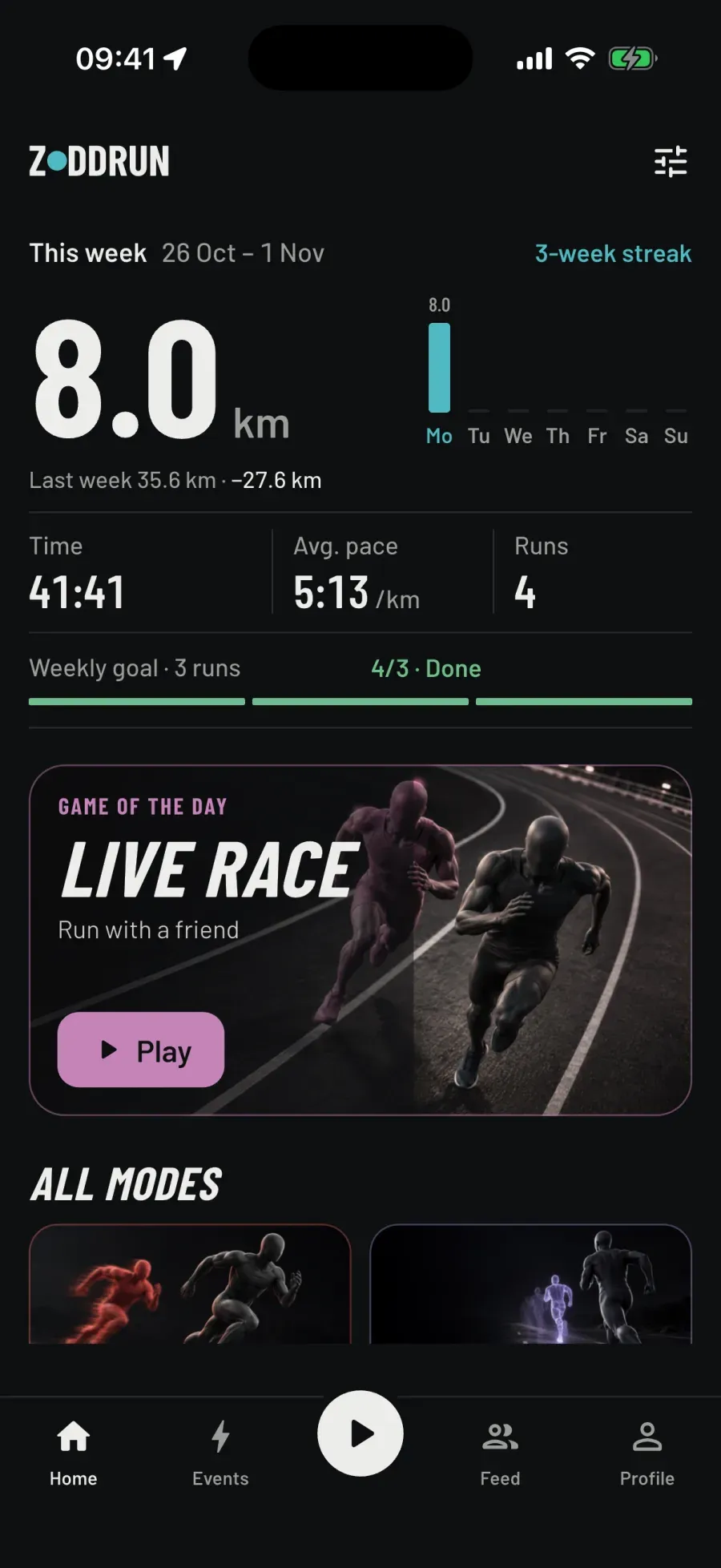
Real screen · iPhone · Home
Does
- Thirteen modes, nine sports, map, feed, clubs, challenges, voice coach, Lock Screen card, widget. The same on both.
- The phone measures the run: with the screen off, in your pocket. If the app dies, the last state stays on disk; at launch a "You have an unfinished run" card appears.
- Three languages: Turkish, English, Russian.
Doesn't
- Ads. Tracking.
- Doesn't take your heart rate, weight, height or date of birth off the phone; none of it goes to the server.
- Doesn't tie your time to the phone's clock: if the clock jumps mid-run, your time doesn't.
-
Apple Watch
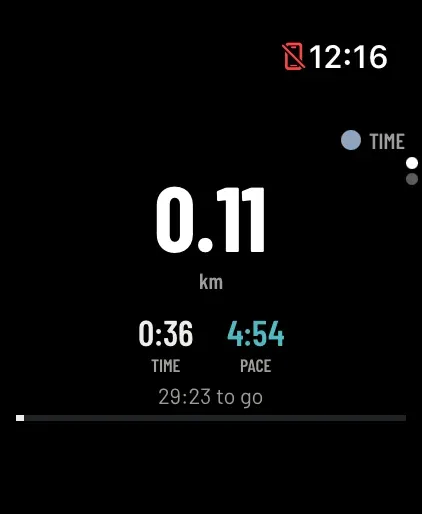
Real screen · Apple Watch Ultra · Run
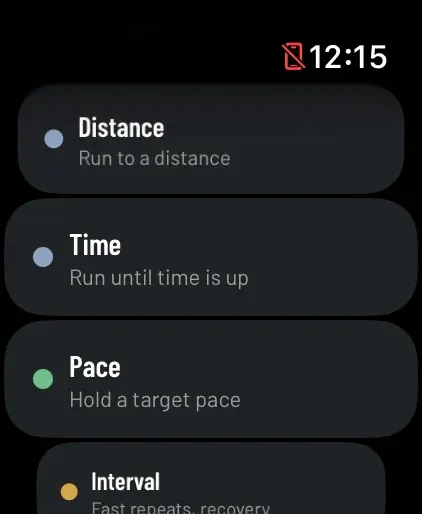
Real screen · Apple Watch Ultra · Modes
Does
- Your heart rate comes from your watch while you run: when the phone starts the run, Zoddrun opens on the watch by itself. Nothing to press on your wrist.
- Or leave the phone behind and run with the watch: all thirteen modes and nine sports are on the watch, in three languages. The run is transferred to your phone; the phone replays it through its own measurement pipeline.
- Events come as taps on your wrist: kilometre, pace drift, segment, goal, catch. Swimming lives only here: laps and strokes in the pool, distance in open water.
Doesn't
- Doesn't write a second workout to Health; the same run never shows up twice. Your heart rate doesn't leave the phone.
- The watch's numbers are approximate; the phone writes the final result: the watch may say 5 km while the phone measures 4.98.
- No auto-pause. Creating a room and sending a chase invite stay on the phone; the watch joins with a code.
-
Wear OS
Does
- The same two uses as Apple Watch: on a run with the phone, your heart rate goes from your wrist to the phone even with the screen off; on a run without it, the mode is picked on the watch and the watch records your position with its own GPS.
- Modes, sports and file format are the same as on Apple Watch. The run moves to your phone when it's nearby, even if the app is closed on the phone.
Doesn't
- Doesn't lose the run if the process dies: samples are written to disk, the service picks up where it left off, and the dead time is recorded as a pause.
- Doesn't wait for heart rate from a watch that doesn't have Zoddrun installed.
- On a watch that can't give distance, a swim doesn't fall back to a run: it says "This watch can't track swims" and doesn't start a recording.
-
Lock Screen card
Does
- On iPhone, a live card on the Lock Screen and in the Dynamic Island: distance, a ticking clock, pace and the mode's line — "4.70 km to go", "On target pace", "Segment 2/14".
- On Android, a notification card: distance, time, pace; Pause / Resume right from the card, even with the screen off.
- It refreshes when what it shows changes, at most once every five seconds; the clock runs on the device by itself, and a pause shows up instantly.
Doesn't
- No buttons on the iPhone card; to pause, use the app. No live card below iOS 16.2.
- Makes nothing up: a heart rate older than 15 seconds isn't shown as "current heart rate"; the field stays empty.
- On Android 13 and later, the card never appears if you don't allow notifications; the run is still measured.
-
Home screen widget
Does
- Small: this week's kilometres, the goal ring, "2/3 runs". Medium: also your streak, last run and bars for eight weeks.
- Tap it and the app opens on run setup, even when it's closed. It updates when a run ends and when the goal changes.
- Text in the app's language: "THIS WEEK", "Go for your first run", "Tap to start".
Doesn't
- Doesn't start a run from the widget; it opens setup and you press Start.
- Doesn't count other sports toward the week: walks, rides and swims stay off the widget.
- No Lock Screen widget.
-
Voice coach
Does
- Every kilometre: "Kilometre 3 complete. Pace 5:12." At halfway and at the goal; in Pace mode "You're 12 seconds slow", in Interval "Fast. 2 of 14."
- In modes with an opponent it calls out the gap: "You're 71 m ahead", "You caught your target", "You escaped". In Conquest: "Loop closed: 12,400 square metres are yours."
- Speaks over your music without silencing it. On a ride it calls out speed; when rowing, pace per 500 m. Heart rate zones if you want them: on entering and leaving the threshold zone, at least ninety seconds apart.
Doesn't
- Doesn't announce places or overtakes in a live race or an event.
- Not a recorded human voice: your device's own voice, in three languages.
- Doesn't talk about heart rate zones unless you turn them on; off by default.
-
Music control
Does
- The track that's playing, on the run screen, with three buttons: previous, pause, next. The card only appears when something is playing; the panel doesn't shift.
- On Android, any player: Spotify, YouTube Music, the browser. With notification access.
- On iPhone, the Music app.
Doesn't
- On iPhone it can't see Spotify or any player other than Music; rather than show a wrong card, it shows none.
- On Android it doesn't read your notifications; the permission is only for seeing the player.
- Pausing the music doesn't touch the run's Pause; the two are separate.
-
Auto-pause
Does
- The clock stops while you wait at a light: it pauses 12 seconds after the last accepted point, and the screen reads "Auto paused".
- It resumes on its own when the step sensor or your speed shows movement, or when you move 12 m from where you stopped.
Doesn't
- Off by default; turn it on in Settings.
- Doesn't work on a treadmill, in sports without distance or in interval workouts: a "2-minute rest" is spent standing still. Not on the watches.
-
Health · Health Connect
Does
- Turn it on in Settings and a finished workout is written to Apple Health or Health Connect: named "Zoddrun run", typed by sport; heart rate samples every 30 seconds.
- If you like, your weight, height and past runs can be read from there: empty fields get filled, filled ones aren't overwritten; runs with a route go through Zoddrun's measurement.
Doesn't
- Off by default. Doesn't read in the background; it reads only when you tap in Settings.
- Doesn't send your heart rate, weight, height or date of birth to the server.
- Takes only running workouts from Health; walks and rides aren't imported. Date of birth isn't read from Health Connect.
iPhone: iOS 15 and later · Android 8.0 and later · Apple Watch: watchOS 10 and later · Wear OS 3 and later · Lock Screen card: iOS 16.2 and later.
06 Sports
Running first. Then eight more sports.
You pick the sport; the app doesn't guess. Each sport has its own measure, and we don't make up what we can't measure: on the pitch and on the waves there's no distance — there's time and heart rate.
-
Running
pace /km
Source GPS
Indoor Treadmill: step counter
Pace is taken between two real measurements. Standing still is 0 m; ground covered in a vehicle or with a simulated location doesn't count.
Modes All thirteen modes. Conquest only here.
On the watch Without the phone, with every mode.
-
Walking
pace /km
Source GPS
Indoor Treadmill walk: step counter
Your ghost is a walk recording; we don't race you against a ride. Interval: 5 × 3 min, pyramid.
Modes All but Conquest: goals, Interval, Ghost, Route ghost, Chase, Escape, Live race, Event, Real chase.
-
Hiking
pace /km + climb
Source GPS
Walking slowly up a steep slope doesn't count as "stopped": the standstill threshold is 20 seconds. Climb comes from the barometer; on a device without one, it's estimated from GPS.
Modes All but Conquest.
-
Cycling
speed km/h
Source GPS
Pace mode is called "Speed" here. Downhills aren't thrown out. The coach calls out your speed every five kilometres. No stationary bike: a step counter can't measure pedalling.
Modes All but Conquest.
-
Rowing
/500 m
Source GPS on water
Indoor Machine: no distance, time and heart rate
Splits are 500 m; /500 m even if you choose miles. The machine's display doesn't reach the phone.
Modes On water, all but Conquest. On the machine: Free, a time goal and timed intervals.
-
Swimming
/100 m
Source Watch only
Indoor Pool: 25 m, 50 m, 33.3 m, 25 yd. Open water: the watch's distance
Phones don't go in the water and GPS doesn't work underwater. In the pool the watch counts laps and strokes; when the swim ends, the recording comes to the phone.
Modes Free, Distance, Time, Pace, Interval, Ghost, Chase, Escape. No Route ghost, live rooms or Conquest.
On the watch Apple Watch and Wear OS. A watch that can't give distance won't start a recording; open water has no map.
-
Five-a-side
time + heart rate
Source No GPS
On a 40×20 m pitch, GPS noise piles up like distance; we don't count it. Time, heart rate (with a watch on) and estimated calories.
Modes Free and a time goal. A match has its own rhythm: no Interval.
On the watch Time and heart rate.
-
Ice skating
time + heart rate
Source No GPS
A rink is an enclosed space; no distance. Time, heart rate and estimated calories.
Modes Free, a time goal, timed intervals: 6 × 1 min, pyramid.
On the watch Time and heart rate.
-
Surfing
time + heart rate
Source No GPS
Nothing counts waves, and we don't make it up. Session time, heart rate and estimated calories.
Modes Free and a time goal.
On the watch Time and heart rate.
- Running only
- Mile points, the world ranking, badges, personal records, the weekly goal, the streak and the home screen widget belong to running alone. Other sports show up in your history, the feed and the "Other sports" row on your profile; they don't go into running stats. No per-sport rankings or badges.
- Challenges
- A challenge's goal is distance (GPS sports and swimming on the watch), time (any sport) or climb (running, walking, hiking, cycling). Climb only counts from recordings measured by a barometer; GPS altitude doesn't count. Only activities Zoddrun measured count: runs imported from Health and manually corrected treadmill distance don't.
Download
Turn running into a game.
Sign in once, then run without internet too. If you like, leave the phone behind and run with the watch; the run is transferred to your phone.
Choose.Run.
iPhone · Apple Watch
Android · Wear OS
All features are free today.
Türkçe · English · Русский