Get the app
Back to the home page

The modes, one by one.

Each mode’s setup, screen, voice coach and result card. Numbers from real screens, rules from the app itself.

01

Free

Just run.

0.87 km
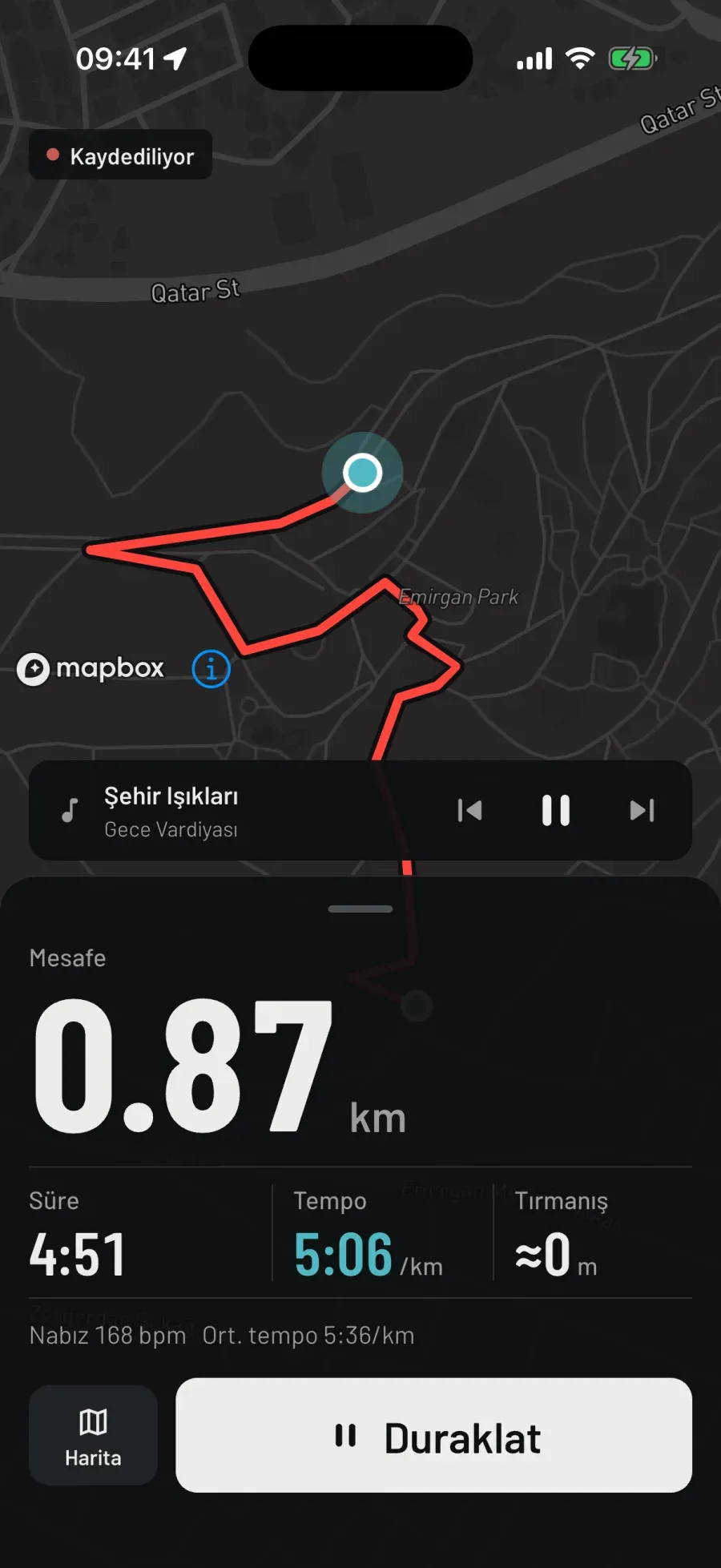
Free run screen: the Recording pill on top, the red trail and the music card on the map; below, distance 0.87 km, time 4:51, pace 5:06 /km, climb ≈0 m; in a muted line, heart rate 168 bpm and average pace 5:36/km; the Map and Pause buttons.

Real screen · iPhone · dark theme

Settings

Where
Outdoor (GPS, route is recorded) · Indoor (treadmill, step counter)
Goal
None
Setup
  • Where: Outdoor (GPS, route is recorded) or Indoor (treadmill, step counter). Goal: Free.
  • No goal. It records your distance, time and pace.
  • Your last setup is remembered; setup starts from it.
While you run
  • Your trail on the map is red. Below, distance in large type; under it time, pace (cyan: now) and climb. Heart rate and average pace share one muted line.
  • A single pill above the map: Recording. If music is playing, its card sits between the map and the panel.
  • No mode-specific line; the lock screen and the watch mirror show only the measurements.
Finish
  • While you run there is one main button: Pause. Finish appears once you pause, so ending by accident takes two steps.
  • On the summary: a note, photos and who sees it. Tap Save and “How should it look in the feed?” asks about visibility and whether to share the route, together.
  • The result is always a success: if you ran, it counts.
Voice coach
  • Kilometre 1 complete. Pace 5:35.

Result card

The summary card always says success: if you ran, it counts.

Notes

  • In Free the coach only counts kilometres. On the bike it speaks once every five splits and gives your speed; when rowing, your pace per 500 m.
  • In sports where distance isn’t measured (rowing machine, five-a-side football, ice skating, surfing) the setup note changes: no goal, it records your time, and your heart rate too if a watch is on.
Sports
All nine sports: running, walking, hiking, cycling, rowing, swimming, five-a-side football, ice skating, surfing. In sports where distance isn’t measured, it records your time, and your heart rate if a watch is on.
On the watch
On Apple Watch and Wear OS too. Or leave the phone behind and run with the watch; the run is transferred to your phone.
Cost
Free.

02

Distance

Run to a distance you set.

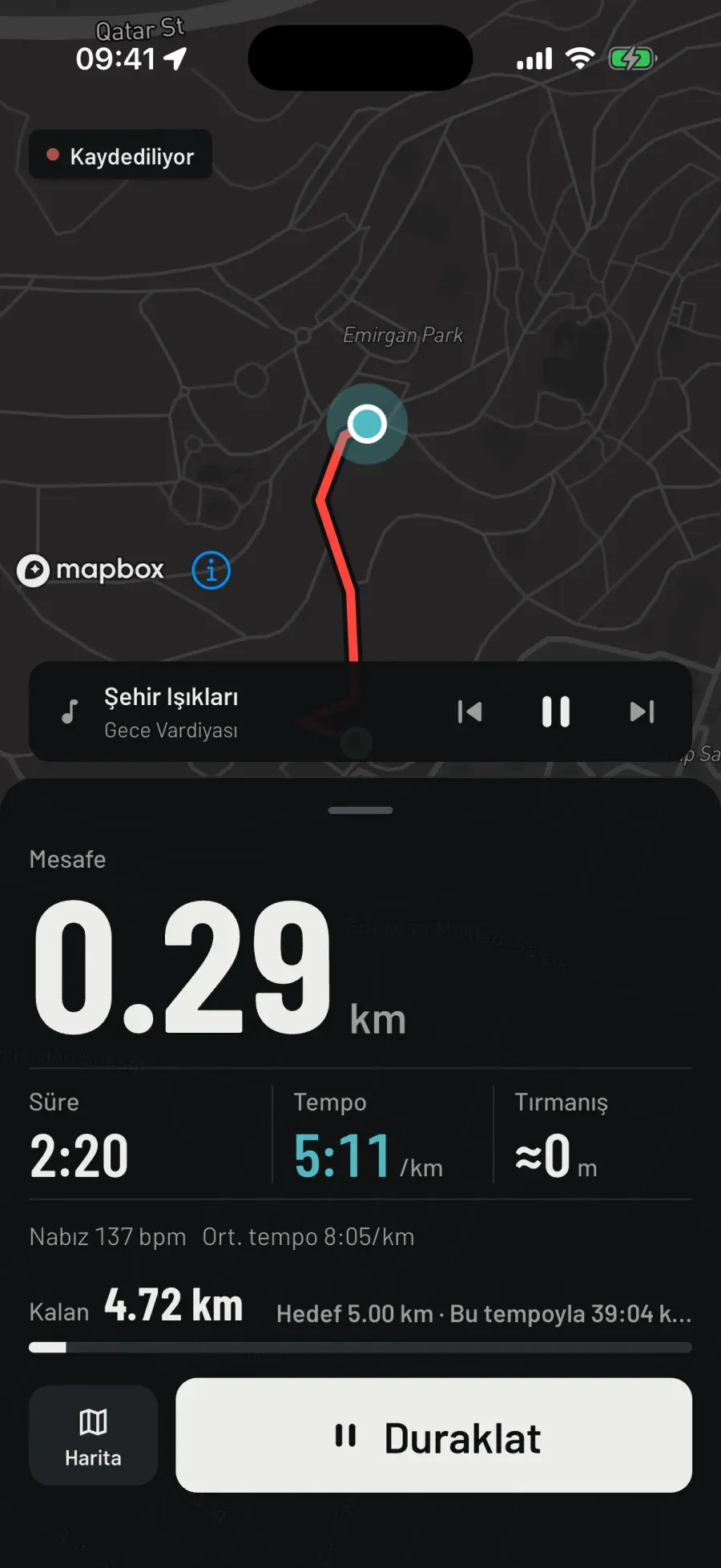
Remaining 4.72 km

Distance run screen in Turkish, 5 km goal: the red trail on the map; distance 0.29 km, time 2:20, pace 5:11 /km, climb ≈0 m; below, Remaining 4.72 km, Target 5.00 km, 39:04 at this pace, and the progress bar.

Real screen · iPhone · dark theme

Settings

Where
Outdoor · Indoor
Target distance
1 · 3 · 5 · 10 · 21.1 · 42.2 km (opens at 5 km)
Other sports
walking 1–10 km · hiking 5–20 km · cycling 10–100 km
Setup
  • Pick one of the preset distances: 1, 3, 5, 10, 21.1 or 42.2 km. It opens at 5 km.
  • For walking, hiking and cycling the chips are the sport’s own distances; on the bike, from 10 to 100 km.
While you run
  • Under the measurements, Remaining and Target; next to them, how much time is left at this pace. The estimate uses average pace: with current pace it would jump on every hill.
  • The lock screen and the watch mirror carry the same line: 4.72 km to go.
  • When you reach the goal, the screen shows Goal complete.
Finish
  • When you reach the goal the coach says so and the screen reads Goal complete. You end the run yourself: Pause, then Finish; keep going if you like.
  • Finish early and the distance is still recorded; the card says “Goal not reached” and shows the distance you ran.
Voice coach
  • You’re halfway.
  • You reached your goal.
  • Kilometre 1 complete. Pace 5:47.

Result card

The result card says “5.00 km goal completed” or “Goal not reached”; below it, the distance you ran.

Notes

  • The estimate uses average pace; current pace changes on a hill, the estimate doesn’t.
  • Reaching the goal doesn’t close the recording: run past it and all of it is recorded.
Sports
Everywhere distance is measured: running, walking, hiking, cycling, rowing on water; swimming on the watch. On a treadmill, with the step counter.
On the watch
On Apple Watch and Wear OS too. Or leave the phone behind and run with the watch; the run is transferred to your phone.
Cost
Free.

03

Time

Run until the time is up.

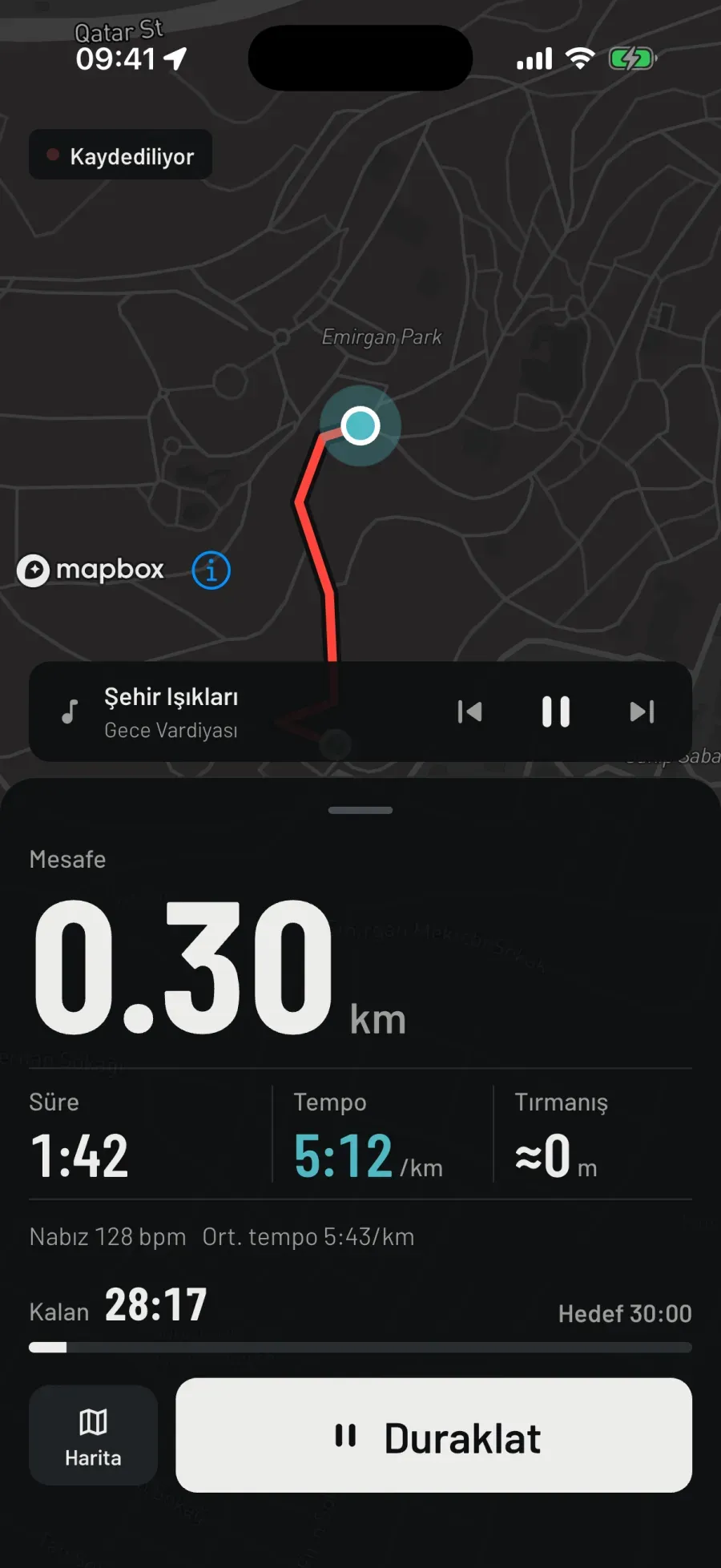
Remaining 28:17

Time run screen in Turkish, 30-minute goal: the red trail on the map; distance 0.30 km, time 1:42, pace 5:12 /km, climb ≈0 m; below, Remaining 28:17, Target 30:00 and the progress bar.

Real screen · iPhone · dark theme

Settings

Where
Outdoor · Indoor
Target time
10–60 min (opens at 30 min)
Other sports
walking 15–60 min · hiking 1–4 h · cycling 30–120 min
Setup
  • Pick the minutes: 10 to 60 for a run, opening at 30 minutes.
  • Walking 15–60 minutes, hiking 1–4 hours, cycling 30–120 minutes.
While you run
  • Remaining counts down; next to it, Target 30:00.
  • The measure is moving time: pause at a red light and the clock stops too. Whoever says “I ran for 30 minutes” really ran for 30 minutes.
  • When the time is up, the screen shows Goal complete.
Finish
  • When the time is up the coach says so; you end the run yourself with Pause and Finish.
  • Distance is what you covered up to that point. If your moving time reached the goal, the goal is done.
Voice coach
  • You’re halfway.
  • You reached your goal.

Result card

If your moving time reached the goal, the card counts the goal as done; distance is what you covered up to that point.

Notes

  • Pausing doesn’t use up the goal; you can take a break and carry on.
  • In a sport where distance isn’t measured, this is the most natural mode: time, heart rate and estimated calories.
Sports
All nine sports, including those where distance isn’t measured: five-a-side football, ice skating and surfing too.
On the watch
On Apple Watch and Wear OS too. Or leave the phone behind and run with the watch; the run is transferred to your phone.
Cost
Free.

04

Pace

Hold your target pace.

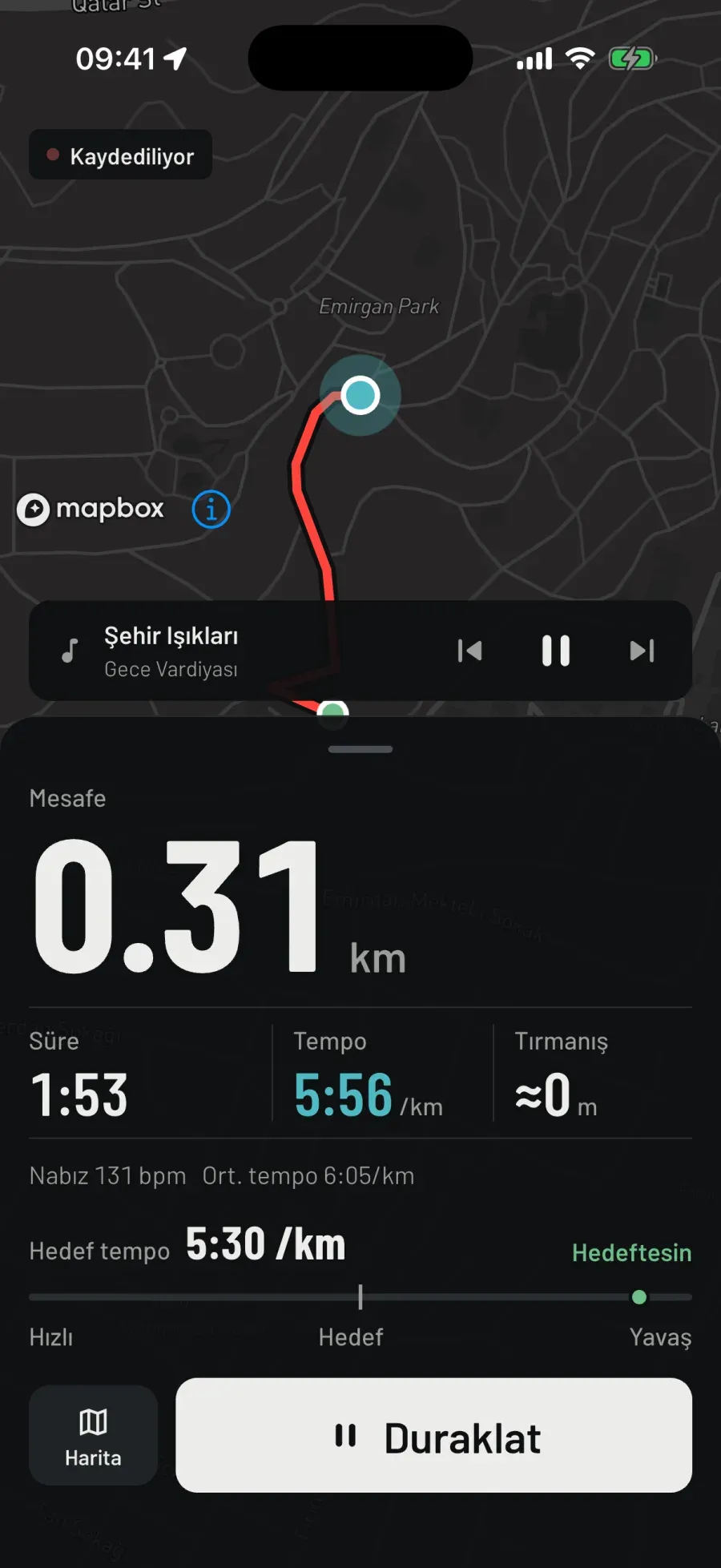
On target

Pace run screen in Turkish, target 5:30 /km: the red trail on the map; distance 0.31 km, time 1:53, pace 5:56 /km; below, Target pace 5:30 /km, a green “On target” and the Fast–Target–Slow scale.

Real screen · iPhone · dark theme

Settings

Target pace
5:30/km to start · 2:30–10:00 · 5 s steps
On the bike (Speed)
25 km/h · 10–50 · 1 km/h steps
Rowing · swimming
2:20 /500 m · 2:00 /100 m
Tolerance
run ±15 s/km · walking, rowing, swimming 4.5% · cycling, hiking 8%
Setup
  • Set your target pace with the stepper: for a run in 5-second steps, opening at 5:30/km, between 2:30 and 10:00.
  • On the bike the mode is called Speed: target 25 km/h, between 10 and 50. Rowing per 500 m, swimming per 100 m.
While you run
  • Current pace in cyan; below it Target pace and your status: On target, how many seconds slow or fast you are, and Measuring pace over the first metres.
  • Tolerance on a run is ±15 s/km. No warning until a drift lasts 15 seconds; at least 45 seconds between two warnings in the same direction. The coach stays quiet for momentary wobbles.
  • Getting back on target is always announced: you should know you’ve fixed it.
Finish
  • It lasts until you finish; this mode has no finish line.
  • The card looks at average pace: within tolerance it says “Target pace held”, otherwise “Target pace missed”. The number of warnings is saved with the run.
Voice coach
  • You’re 15 seconds slow.
  • You’re 15 seconds fast.
  • You’re on target pace.

Result card

If average pace is within tolerance, “Target pace held”, otherwise “Target pace missed”; the number of warnings is saved with the run.

Notes

  • The coach doesn’t speak on every drift: a drift shorter than 15 seconds isn’t a warning, and there are at least 45 seconds between two warnings in the same direction.
  • Same line on the lock screen and the watch: On target pace, or how many seconds slow you are and the target. On the bike it all says speed.
Sports
Running, walking, hiking, cycling (Speed), rowing on water; swimming on the watch. Tolerance ±15 s/km on a run; 4.5% for walking, rowing and swimming; 8% for cycling and hiking.
On the watch
On Apple Watch and Wear OS too. Or leave the phone behind and run with the watch; the run is transferred to your phone.
Cost
Free.

05

Interval

Fast. Recover. Repeat.

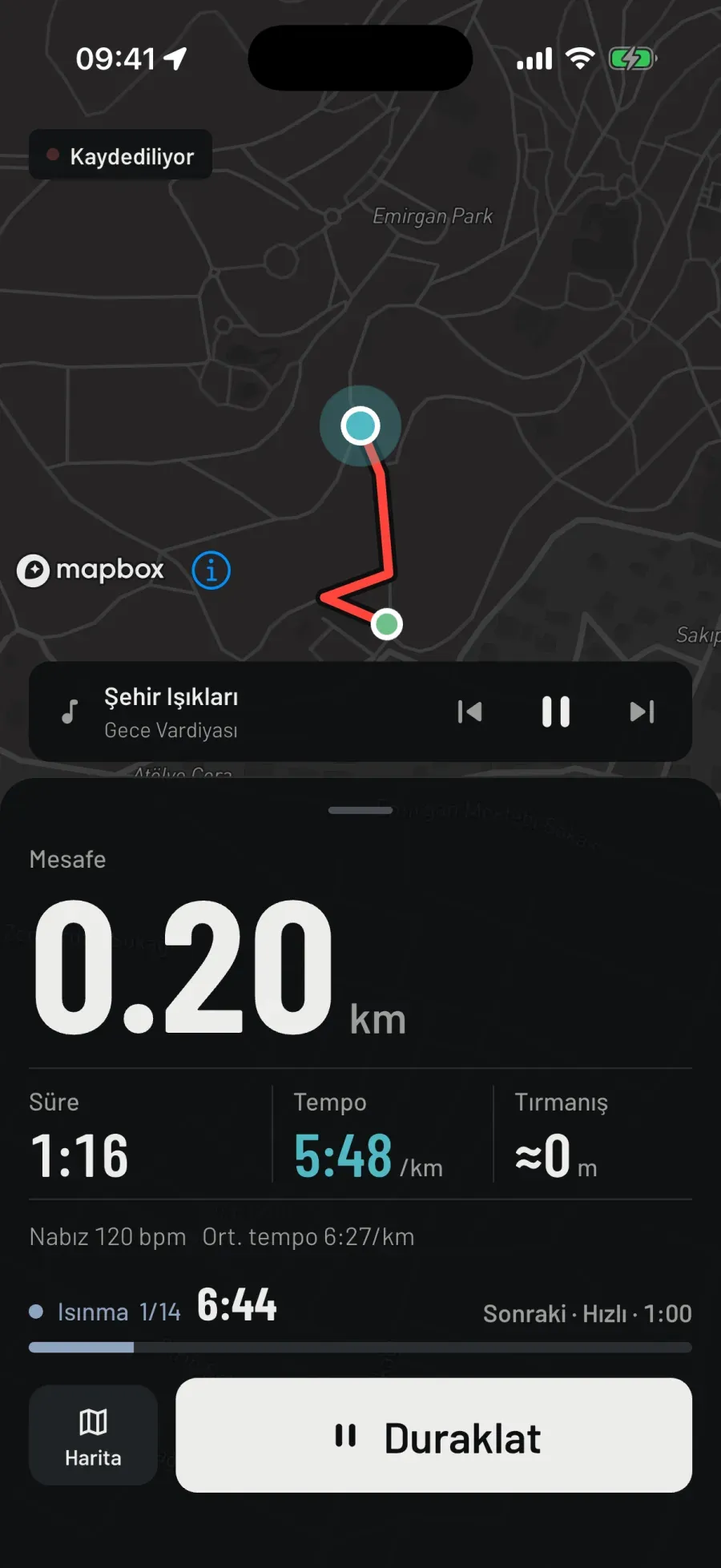
Warm-up 1/14

Interval run screen in Turkish, 6 × 1 minute, during the warm-up: the red trail on the map; distance 0.20 km, time 1:16, pace 5:48 /km; below, Warm-up 1/14, 6:44 left in the segment, Next · Fast · 1:00 and the progress bar.

Real screen · iPhone · dark theme

Settings

Workout (run)
4 × 800 m · 6 × 1 minute · Pyramid 1-2-3-2-1 min
Walking · hiking
5 × 3 min · pyramid
Cycling
5 × 4 min · 6 × 1 min · pyramid
Rowing (on water)
8 × 500 m · 5 × 4 min · 6 × 1 min
Swimming
10 × 100 m · 5 × 200 m
Ice skating
6 × 1 min · pyramid
Setup
  • Pick a ready-made workout from the list. For a run: 4 × 800 m (10 minutes of warm-up and cool-down), 6 × 1 minute (8 minutes warm-up, 1 minute fast, 2 minutes recovery, 8 minutes cool-down), Pyramid 1-2-3-2-1 min.
  • On the bike 5 × 4 minutes, 6 × 1 minute and the pyramid; rowing on water 8 × 500 m; swimming 10 × 100 m and 5 × 200 m.
While you run
  • On screen, the segment’s name and counter: Fast 2/14, what’s left of the segment, and Next. Segments: Warm-up, Fast, Recovery, Rest, Cool-down.
  • Transitions come with voice and vibration; you don’t need to look at the screen.
  • Each segment is measured from its own start: even if an 800 m rep shows 806, the difference isn’t carried into the next one.
Finish
  • When the last segment ends the screen says Workout complete; you close the recording yourself with Pause and Finish.
  • Finish early and the card says “left unfinished” and shows how many segments you completed. Finishing the workout earns the “Track” bib.
Voice coach
  • Fast. 2 of 14.
  • Recovery. 3 of 14.
  • Workout complete.

Result card

“6 × 1 minute completed” or “left unfinished”; below it, the number of segments completed. The summary shows each rep separately.

Notes

  • The 1/14 on screen counts the fourteen segments of the 6 × 1 minute workout: warm-up, six fast, six recovery, cool-down.
  • Workouts are picked from a ready-made list.
Sports
Running, walking, hiking, cycling, rowing, swimming. On the rowing machine and ice skating, timed workouts only; none in five-a-side football or surfing: the match and the waves have their own rhythm.
On the watch
On Apple Watch and Wear OS too. Or leave the phone behind and run with the watch; transitions buzz on your wrist.
Cost
Free.

06

Ghost

Yesterday’s you.

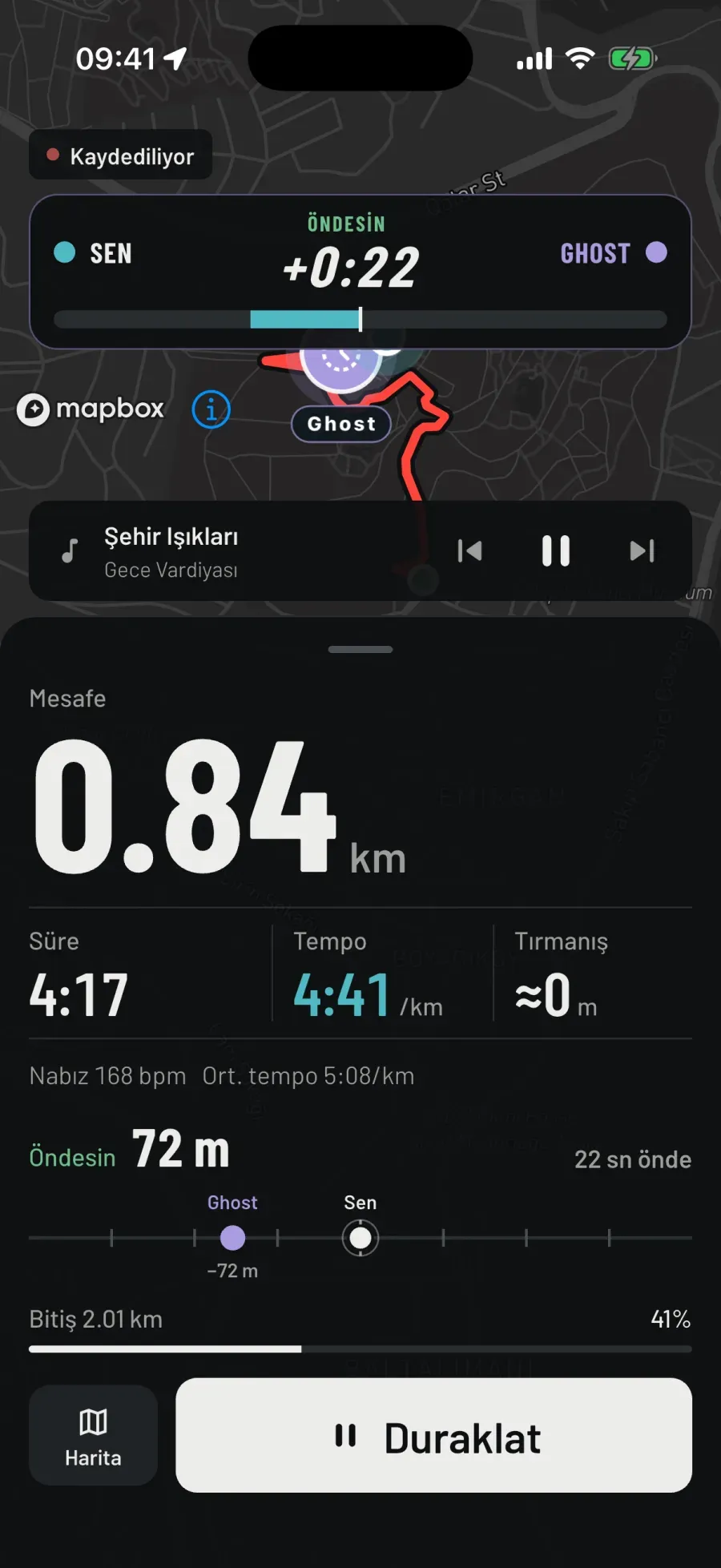
Ahead 72 m

Ghost run screen: the duel panel above the map: You, Ahead +0:22, Ghost; the bar under it filled towards your side; a purple Ghost marker and the red trail on the map; below, distance 0.84 km, time 4:17, pace 4:41 /km; Ahead 72 m, 22 s ahead; on the track Ghost −72 m; Finish 2.01 km, 41%.

Real screen · iPhone · dark theme

Settings

Opponent run
same sport · finished · at least 400 m · last 50 sessions
Compare by
Distance & time (default) · Same route (Route ghost)
Setup
  • Pick one of your past runs from the opponent run list: same sport, finished, at least 400 m, from your last 50 sessions.
  • Compare by: Distance & time. You don’t need to run the same route; that day’s time–distance curve is replayed.
  • If you have no runs yet, the screen tells you: record a few runs first.
While you run
  • The duel panel above the map: you on the left, the ghost on the right, the gap in the middle; for a ghost in seconds (+0:22). The bar under it fills towards whoever is ahead.
  • The moment you take the lead, a slanted banner crosses the middle of the map: You took the lead!
  • Below, Ahead or Behind in metres, with the seconds next to it. On the track the ghost is purple, you are white. Finish is the distance the ghost covered that day; progress as a percentage.
  • Same line on the lock screen and the watch: Ghost 72 m behind.
Finish
  • The race ends when you reach the ghost’s total distance. If your time is equal or shorter, you won.
  • The summary opens with the game-over cover: Ghost beaten, you finished 63 seconds ahead, and Rematch. Rematch opens the same mode’s setup.
  • If you won, the share button is in the mode’s colour: Share the win. The first template is the Game card: cover, result band, route, distance, time and pace.
  • Finish before reaching the ghost’s distance and the card says “Ghost distance not reached”. Finishing ahead earns the “Ghost buster” bib.
Voice coach
  • You’re 50 metres ahead.
  • You took the lead.
  • You won the race.

Result card

“Ghost beaten” or “Ghost won”; below it, “you finished 63 seconds ahead” or how many seconds behind. Rematch on the cover.

Notes

  • The coach speaks at gap thresholds: 10, 25, 50, 100, 200 m; each threshold once, only the largest.
  • The first 20 seconds and anything under 15 metres are warm-up: no verdict. At least 20 seconds between lead changes.
Sports
Running, walking, hiking, cycling, rowing on water; swimming on the watch. The ghost is from the same sport: a cyclist races a ride.
On the watch
On Apple Watch and Wear OS too; ghost runs go to the watch from the phone’s catalogue. Or leave the phone behind and run with the watch.
Cost
Free for now; Premium later.

07

Route ghost

Today, the same road.

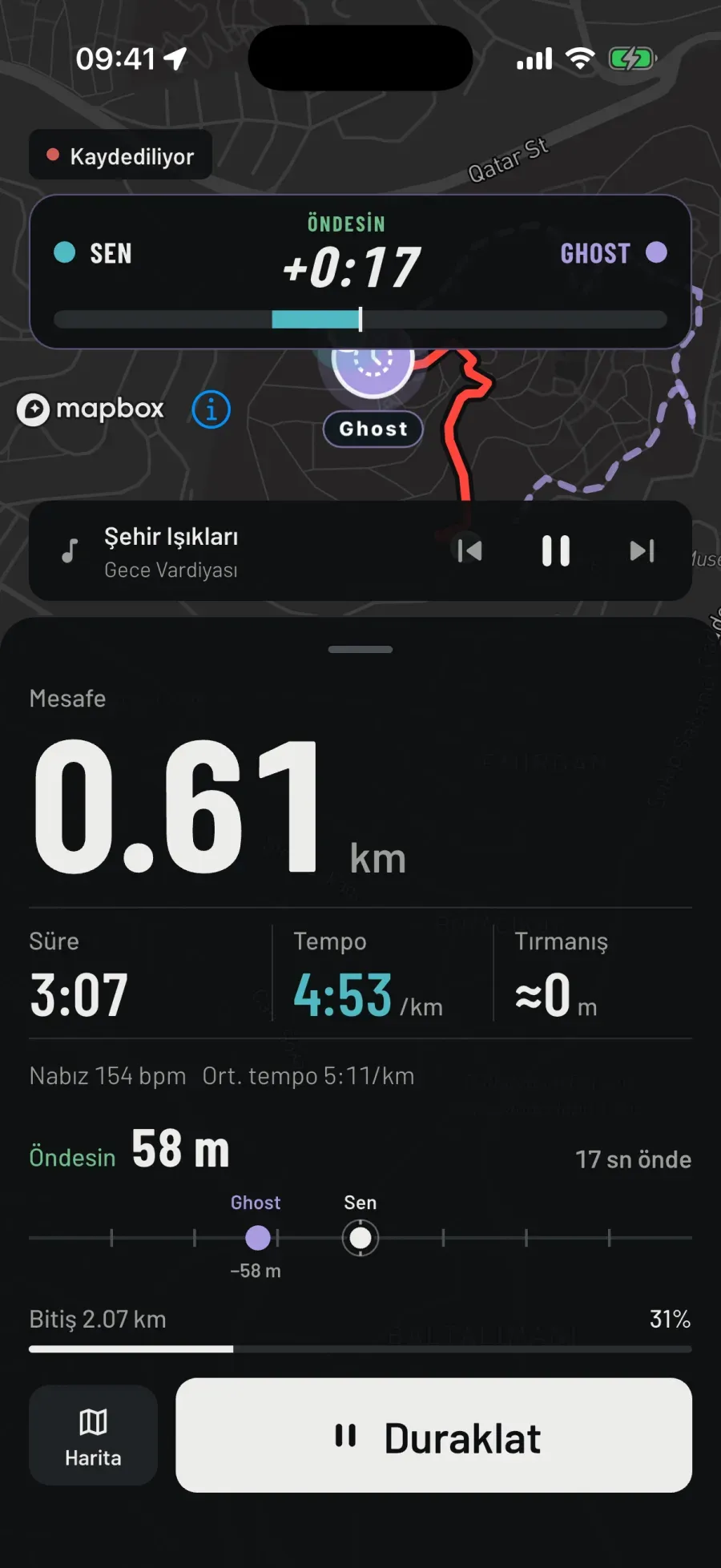
Ahead 58 m

Route ghost run screen in Turkish: the duel panel on top, You, Ahead +0:17, Ghost; on the map the ghost marker, the road ahead of the ghost as a dashed line, your trail in red; distance 0.61 km, time 3:07, pace 4:53 /km; Ahead 58 m, 17 s ahead; Finish 2.07 km, 31%.

Real screen · iPhone · dark theme

Settings

Compare by
Same route
Route
your outdoor runs with a route · same sport · at least 400 m · distance to the start shown in the list
Where
outdoor only
Setup
  • In the Ghost tile, Compare by: Same route. The Route list shows your outdoor runs that have a route, and how far away each one starts.
  • The ghost runs that road the way it did that day. Not on a treadmill: there’s no route to follow.
While you run
  • The gap is measured by where you each are on the route, not by distance: where you were on the same road.
  • The ghost’s clock starts when you join the route; running from home to the start costs you nothing. Leave the route and the gap calls stop; come back and it’s measured again. Shortcuts don’t pay.
  • On the map the ghost moves along the route; the duel panel on top, the track and the Finish bar below.
Finish
  • Within 30 m of the route’s end you count as finished. Get there first and you won.
  • The card compares the two runs: “You finished the route ahead of your ghost”, “Your ghost finished the route first” or “Route not finished”; it shows how much of the route you ran. Rematch opens with the same route selected.
  • Tomorrow your rival is today’s you.
Voice coach
  • You’re on the route. Your ghost is off.
  • You’ve left the route. The gap resumes when you’re back on it.
  • Back on the route.

Result card

“You finished the route ahead of your ghost” or “Your ghost finished the route first”; below it, how much of the route you ran. Tomorrow your rival is today’s you.

Notes

  • Within ±35 m of the route you count as “on route”, beyond 60 m as “off route”; there’s room for GPS error.
  • Pauses on the ghost’s curve are filled in at average speed; a shortcut doesn’t gain progress.
Sports
Running, walking, hiking, cycling, rowing on water. Not in swimming or on a treadmill.
On the watch
On Apple Watch and Wear OS too; routes go to the watch from the phone’s catalogue. Or leave the phone behind and run with the watch.
Cost
Free for now; Premium later.

08

Chase

Catch up.

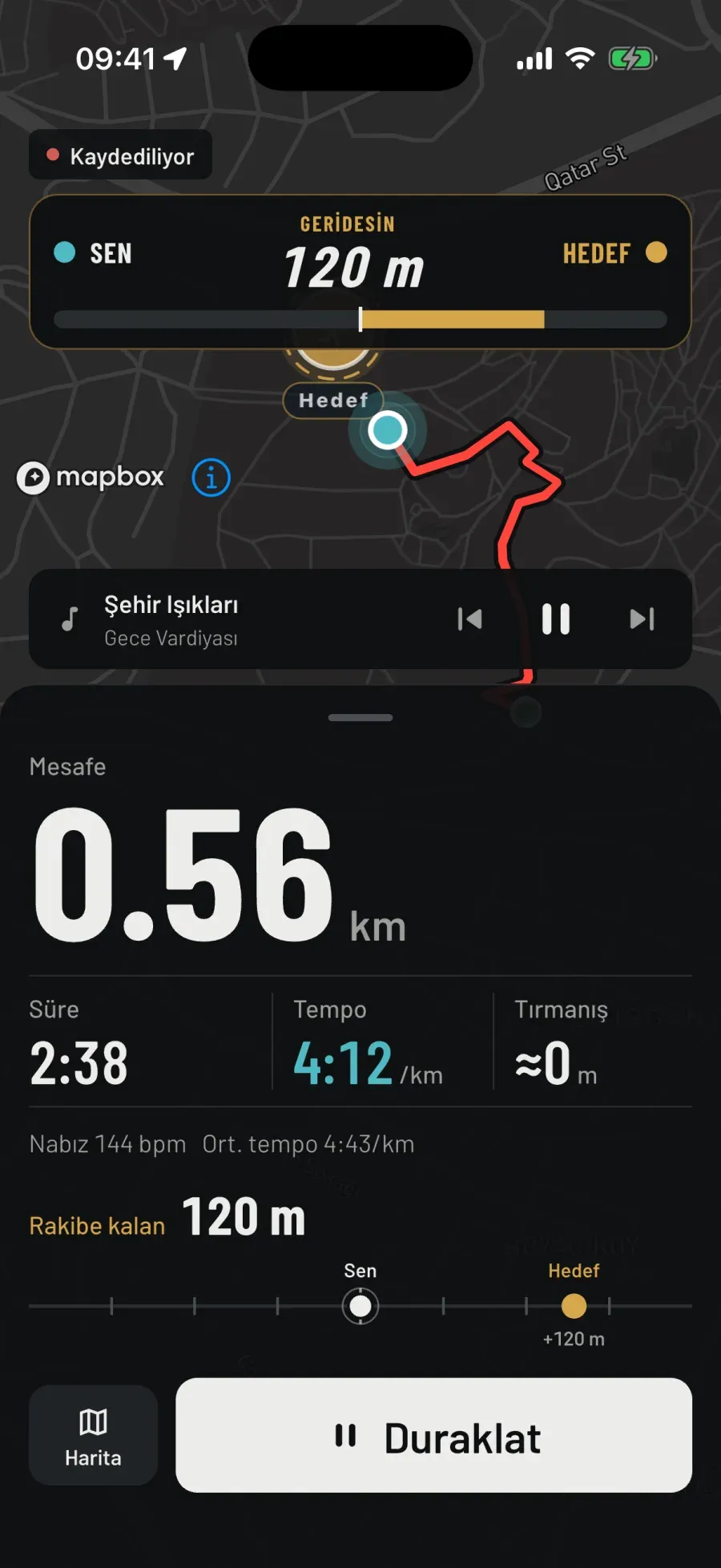
Gap to opponent 120 m

Chase run screen: the duel panel above the map: You, Behind 120 m, a yellow Target; a yellow Target marker and the red trail on the map; below, distance 0.56 km, time 2:38, pace 4:12 /km; gap to opponent 120 m, on the track Target +120 m.

Real screen · iPhone · dark theme

Settings

Difficulty (run)
Easy 6:30/km · 300 m · Medium 5:30 · 500 m · Hard 4:45 · 800 m · Custom
Opponent type
Steady pace · Negative split (first 10 min 40 s slower)
Opponent head start
200 · 300 · 500 · 800 · 1000 m
Opponent pace
stepper
Catch radius
10 m
Setup
  • Pick a difficulty: Easy, Medium, Hard or Custom. On a run the opponent is 300 m ahead at 6:30/km, 500 m at 5:30, 800 m at 4:45.
  • With Custom you set the opponent’s pace and head start (200–1000 m). Opponent type: Steady pace, or Negative split: it starts 40 seconds slower for the first 10 minutes, then settles into the target pace.
While you run
  • The duel panel shows Behind and the metres between you; below, the gap to the opponent, metre by metre. As long as you run faster than it, the gap closes.
  • On the map the opponent carries the Target marker; on the track, you and the target. On the lock screen: Target 120 m ahead.
  • The coach calls the gap as you close in; it doesn’t repeat a growing gap.
Finish
  • When the gap drops to 10 metres you’ve caught it: a “Caught” banner crosses the map and the game ends; you close the run with Pause and Finish. The “Hunter” bib.
  • The cover says Target caught, where (at the 1.09 km mark) and offers Rematch; below it, the Gap to the target chart: how the gap closed over the run and the closest moment.
  • Finish without catching it and the card says “Target got away” and how many metres behind you were.
Voice coach
  • Kilometre 3 complete. Pace 5:12.
  • You caught your target.
  • You reached your goal.

Result card

“Target caught”, with the mark where it happened below; or “Target got away”, with how many metres behind you were below. Rematch and the gap chart on the cover.

Notes

  • The opponent isn’t a recording but a generated runner: steady pace or a pace that speeds up in a straight line. It doesn’t adapt to you and it doesn’t attack.
  • A catch counts within 10 metres: stepping exactly on top of it would be impossible with GPS.
Sports
Running, walking, hiking, cycling, rowing on water; swimming on the watch. Difficulties follow the sport’s pace: walking, 100 m ahead at 13:00/km; cycling, 200 m at 20 km/h.
On the watch
On Apple Watch and Wear OS too; the opponent is generated, so difficulty, pace and gap are set on the watch as well. Or leave the phone behind and run with the watch.
Cost
Free for now; Premium later.

09

Escape

Get away.

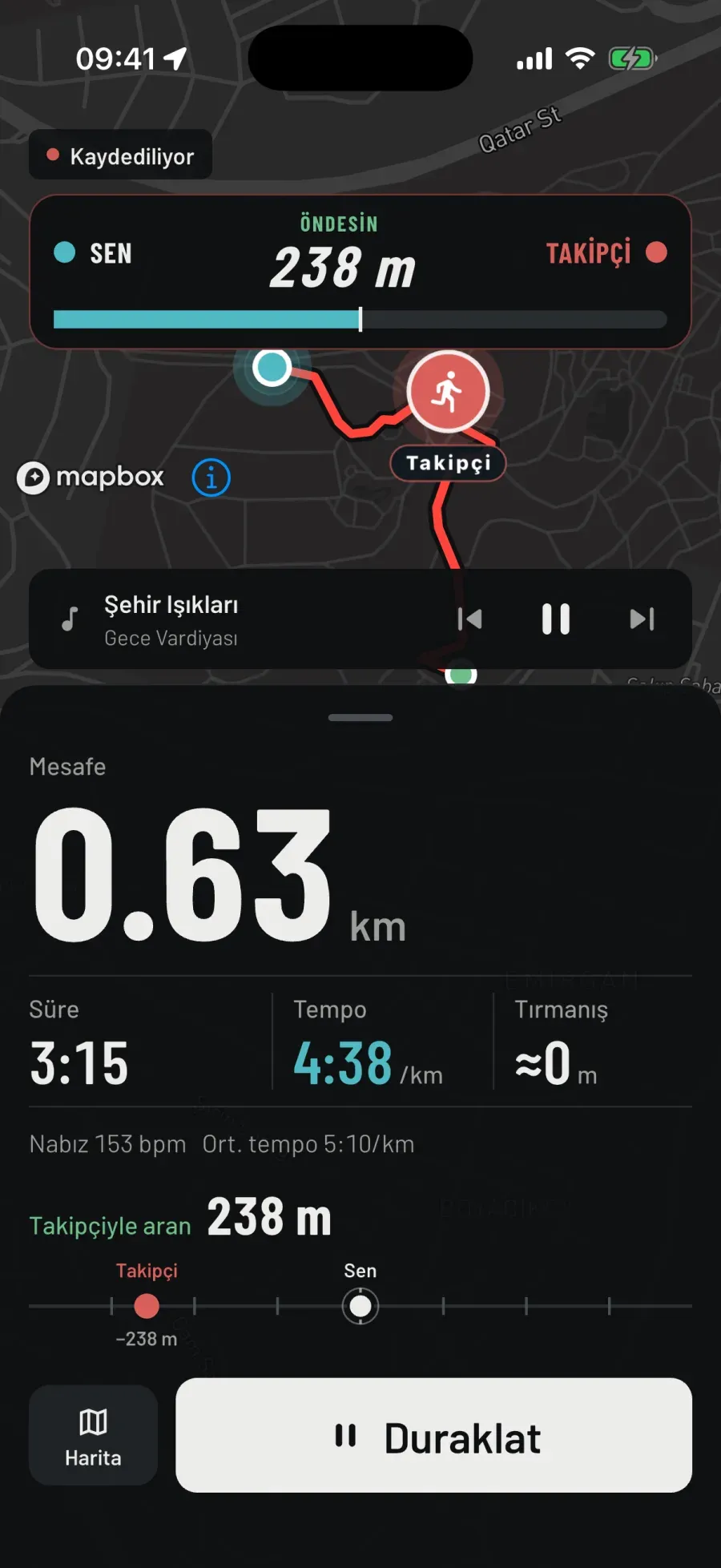
Gap to chaser 238 m

Escape run screen: the duel panel above the map: You, Ahead 238 m, a red Chaser; the red Chaser marker behind you and the red trail on the map; below, distance 0.63 km, time 3:15, pace 4:38 /km; gap to chaser 238 m, on the track Chaser −238 m.

Real screen · iPhone · dark theme

Settings

Difficulty (run)
Easy 6:30/km · 300 m · Medium 5:30 · 500 m · Hard 4:45 · 800 m · Custom
Opponent type
Steady pace · Negative split
Gap to the chaser
200 · 300 · 500 · 800 · 1000 m
Chaser pace
stepper
Survival time
10 · 20 · 30 · 45 min (hiking 20–60, cycling 15–60)
Setup
  • The same difficulties and opponent type as Chase. Gap to the chaser: 200–1000 m. The chaser’s pace.
  • Survival time: 10, 20, 30 or 45 minutes. Hiking 20–60, cycling 15–60.
While you run
  • The duel panel shows Ahead and the metres to the chaser; below, the gap to the chaser. Slow down and the gap melts; the coach tells you it’s closing in.
  • On the map the chaser is behind you with the red Chaser marker; on the track, the chaser and you.
Finish
  • Not caught by the time it’s up: an “Escaped” banner crosses the map, and the “Escaped” bib. If the chaser passes you, Caught, and the game ends right there; the run is still recorded.
  • The cover shows the result and Rematch, with the Gap to the chaser chart below. Finish early and it reads: Escape unfinished, you held out 4:08, short of the target time.
  • The end of the time is checked before the catch: caught by a hair at the very moment you complete the target doesn’t count as a loss.
Voice coach
  • You’re 100 metres ahead.
  • You escaped. You lasted 20 minutes.
  • You were caught.

Result card

“You got away” and how many minutes you survived; “You were caught” and at which mark; “Escape unfinished”: how long you held out, short of the target time. Rematch and the gap chart on the cover.

Notes

  • The coach only calls a shrinking gap: 500, 300, 200, 100, 50 m, each once.
  • Someone’s behind you. The chaser is virtual, the escape is real.
Sports
Running, walking, hiking, cycling, rowing on water; swimming on the watch.
On the watch
On Apple Watch and Wear OS too; the chaser is generated, so difficulty, pace, gap and time are set on the watch as well. Or leave the phone behind and run with the watch.
Cost
Free for now; Premium later.

10

Live race

Different places, same time.

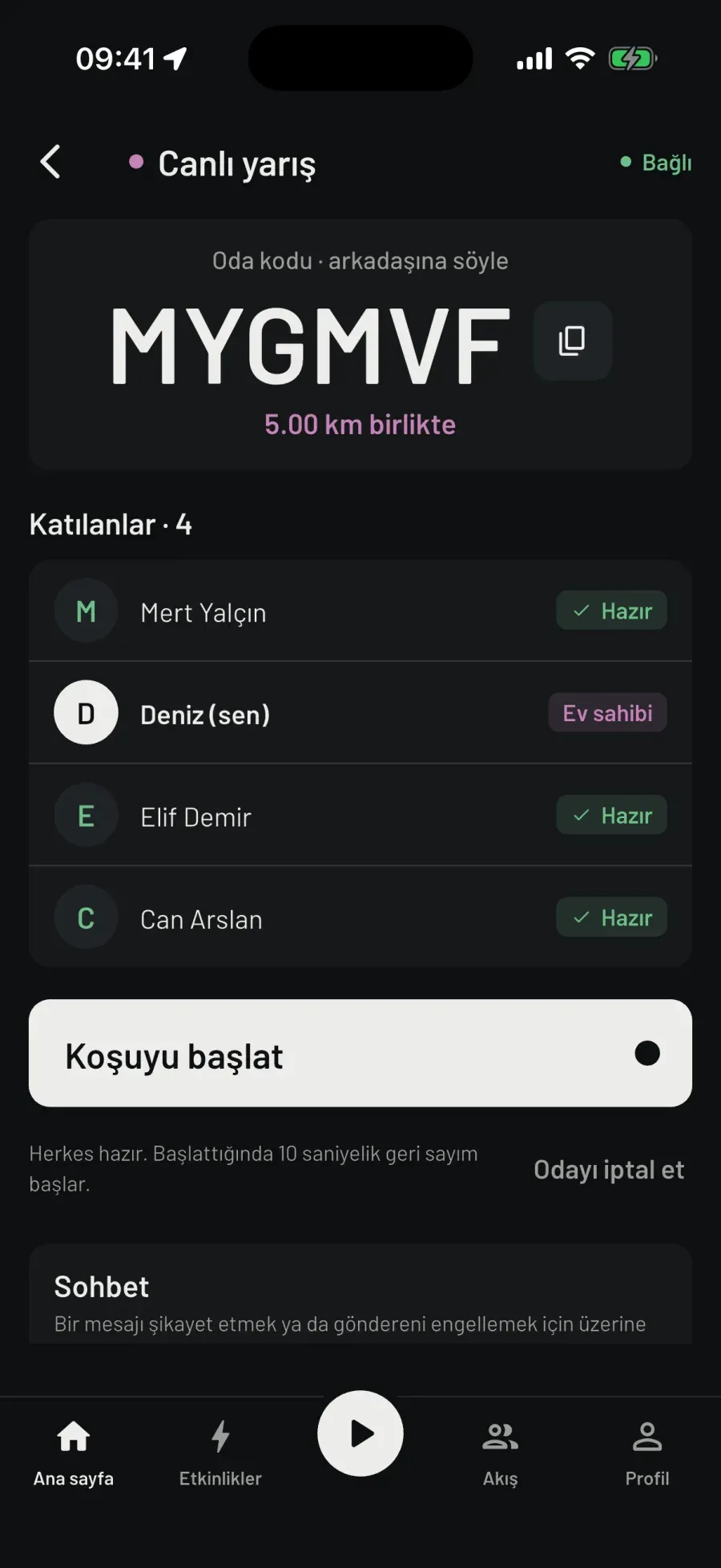
MYGMVF · 5.00 km together

Live race lobby in Turkish: Connected at the top right; room code MYGMVF, 5.00 km together; Participants · 4: Mert Yalçın ready, Deniz (you) host, Elif Demir ready, Can Arslan ready; the Start the run button and “Everyone is ready. When you start, a 10-second countdown begins.”

Real screen · iPhone · dark theme

Settings

Goal
Free · Distance · Time
Sport
running · walking · hiking · cycling · rowing on water
Preset distances
running 1–21.1 km (5 km) · walking 1–10 km · hiking 3–15 km · cycling 10–80 km · rowing 500 m–5 km
Team room
two teams, average distance side by side
Joining
6-character room code, e.g. K7M2QX
Countdown
10 s, on server time
Setup
  • The Live race card on the home screen, or “Add an opponent or a workout” in setup, opens the lobby. Open a room, or join with a six-character code. Goal: Free (no finish line), Distance (there is a finish line; you see who finished when) or Time (when the time is up, everyone’s distance is shown).
  • The room has one sport and everyone does it. If you like, a Team room: runners split into two teams, and both teams’ average distance is shown side by side.
  • In the lobby everyone taps I’m ready and the host starts the run; the 10-second countdown runs on server time, for everyone at once.
While you run
  • The list shows everyone’s distance, pace and time; not their location. Coordinates never go to the server.
  • On screen, you and the runner just ahead of you; your place and the total, how far in front the front runner is, how many are running together, how many have finished.
  • The duel panel and the “You took the lead!” banner of the virtual opponents aren’t here: there are people on the other side.
  • If the connection drops the panel says “no connection”; the race doesn’t end, only the other runners’ data stops.
Finish
  • Your run ends when you reach the goal or tap Finish; the room closes with the last runner.
  • Finish order and times stay in the list as information: who finished when. The summary opens with the live race cover and a neutral line: “You finished the race”, how many you ran with, the name of the first finisher. No rematch. The “First live race” bib is about taking part.
Voice coach
  • Mert is 100 m ahead.
  • Finished. Place 3 of 27.

Result card

“You finished the race” or “You did not reach the finish line”; below it, how many of you ran together and who finished first. In a room with a finish order, finishing is the achievement; the card turns red for no one.

Notes

  • The other runners’ distance arrives every 3 seconds and is dead-reckoned in between; data older than 10 seconds means “no connection”.
  • Race time is wall-clock time: pausing doesn’t stop it. A place stays provisional for 5 seconds, then it’s final; crossing at the same moment means the same place.
  • There’s a chat in the lobby: up to 280 characters, one message a second, not written to the database.
Sports
Running, walking, hiking, cycling, rowing on water. No swimming; not on a treadmill.
On the watch
On the phone. With a watch on, heart rate comes from the watch.
Cost
Free for now; Premium later.

11

Event

Everyone at once.

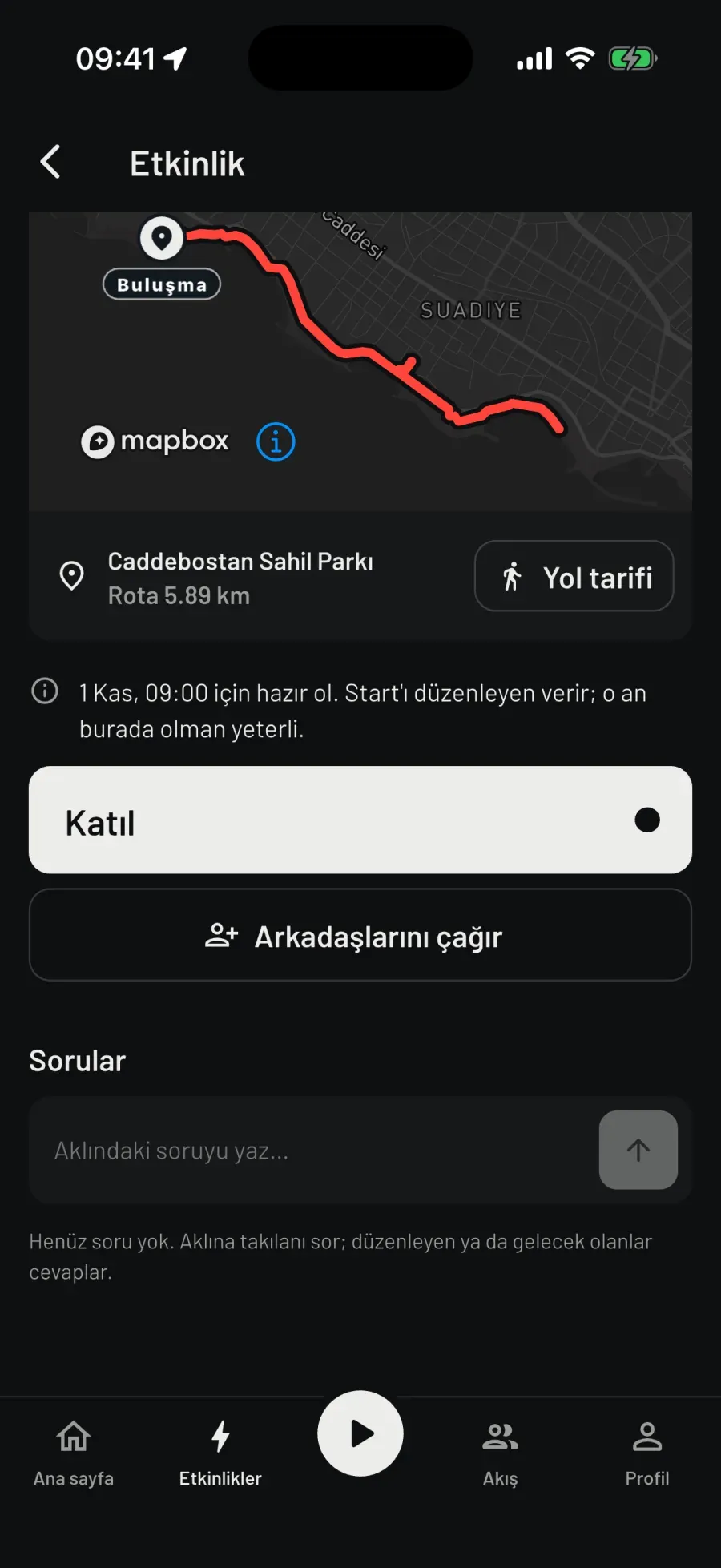
Route 5.89 km

The lower half of an event page in Turkish: the red event route and the Meet pin on a dark map, Caddebostan Sahil Parkı, Route 5.89 km, Directions; “Be ready for 1 Nov, 09:00. The organiser gives the start; just be here then.”; the Join and Invite friends buttons; Questions.

Real screen · iPhone · dark theme

Settings

Opened by
the club’s admin or the organiser
Kind
With a finish line · Group run
Sport
running · walking · hiking · cycling · rowing on water
Start
given by the organiser; the announced time isn’t automatic
Joining
before it starts; you can’t join an event once it has started
Setup
  • The event is opened by the club’s admin or the organiser: meeting point, drawn route, time, sport. You tap Join.
  • Two kinds: With a finish line (you see who finished when) and Group run (no ranking).
  • Anyone can look at the list; you can’t join an event once it has started.
While you run
  • The announced time isn’t an automatic start: “Be ready for 09:00. The organiser gives the start; just be here then.”
  • Once it starts, Go to the run; your progress is visible to those who joined, your location goes to no one. On screen, the runner just ahead of you; if you’re on your own, what’s left to the goal.
Finish
  • The organiser ends it. The results list is on the event page: who covered how much, in what time. A group run has no order.
  • The summary opens with a cover and a neutral line: “You finished the event” or “You ran in the event”, and how many you ran with. Badges are about taking part.
Voice coach
  • Ahmet is 100 m ahead.
  • Kilometre 4 complete. Pace 5:30.
  • Finished. Place 3 of 27.

Result card

“Event finished · how many people ran together · the place you finished”; no order in a group run. Comments are on the event page.

Notes

  • An event has a meeting point, a route, a cover photo, comments and questions.
  • Safety net: if it has been live for 24 hours and no one has reported progress for 1 hour, the event ends by itself.
Sports
Running, walking, hiking, cycling, rowing on water. Each event has one sport.
On the watch
On the phone. With a watch on, heart rate comes from the watch.
Cost
Free for now; joining will need Premium later. Club members always join their own club’s events for free.

12

Real chase

With a friend nearby.

200 m between you and Mert

Settings

Role
I’ll run · I’ll chase
Duration
10 · 15 · 20 · 30 · 45 min (default 20)
Head start
30 · 60 · 120 s (default 60)
To start
friends list · explicit consent · less than 3 km apart
Catch
25 m · two fresh locations · accuracy 30 m or better · 3 readings in a row
Setup
  • Invite someone from your friends list: your role is I’ll run or I’ll chase; time 10–45 minutes; head start 30, 60 or 120 seconds.
  • The invitee gives explicit consent: “During the game your location is shared only with Mert.” The invite is valid for 30 minutes.
  • It won’t start if you’re more than 3 km apart; you both need a fresh location. The host starts it, with a 10-second countdown.
While you run
  • On screen: your role, the head-start counter, time left and the distance between you. On the map, your friend’s location, only while the game is on.
  • Your location is shared only with this friend; the server keeps it in memory, never writes it down, and deletes it when the game ends.
  • The coach is neutral: “Your chaser is on the move.” and, at 500, 200, 100 and 50 metres, “… between you and Mert”.
Finish
  • The catch is decided on the server: 25 m radius, two fresh locations, accuracy of 30 m or better, three readings in a row. A single jumpy GPS sample doesn’t end the game.
  • “Mert caught up with you.” or “Time’s up. 200 m between you.” Nobody loses; there’s a person on the other side. The card is always neutral.
Voice coach
  • Your chaser is on the move.
  • 100 m between you and Mert.
  • Time’s up. 200 m between you.

Result card

“Chase over”: “Mert caught up with you”, “You caught up with Mert” or “Time’s up · 200 m between you”. The card is neutral; it never says “you did it”.

Notes

  • Real chase has no screen recording: it needs two accounts in the same area. What you see here is a diagram, not a fake screen.
  • “End the chase” ends it for both of you and stops the sharing.
Sports
Running, walking, hiking, cycling, rowing on water: with GPS. No swimming, nothing indoors.
On the watch
On the phone. With a watch on, heart rate comes from the watch.
Cost
Free for now; Premium later.

13

Conquest

What you enclose is yours.

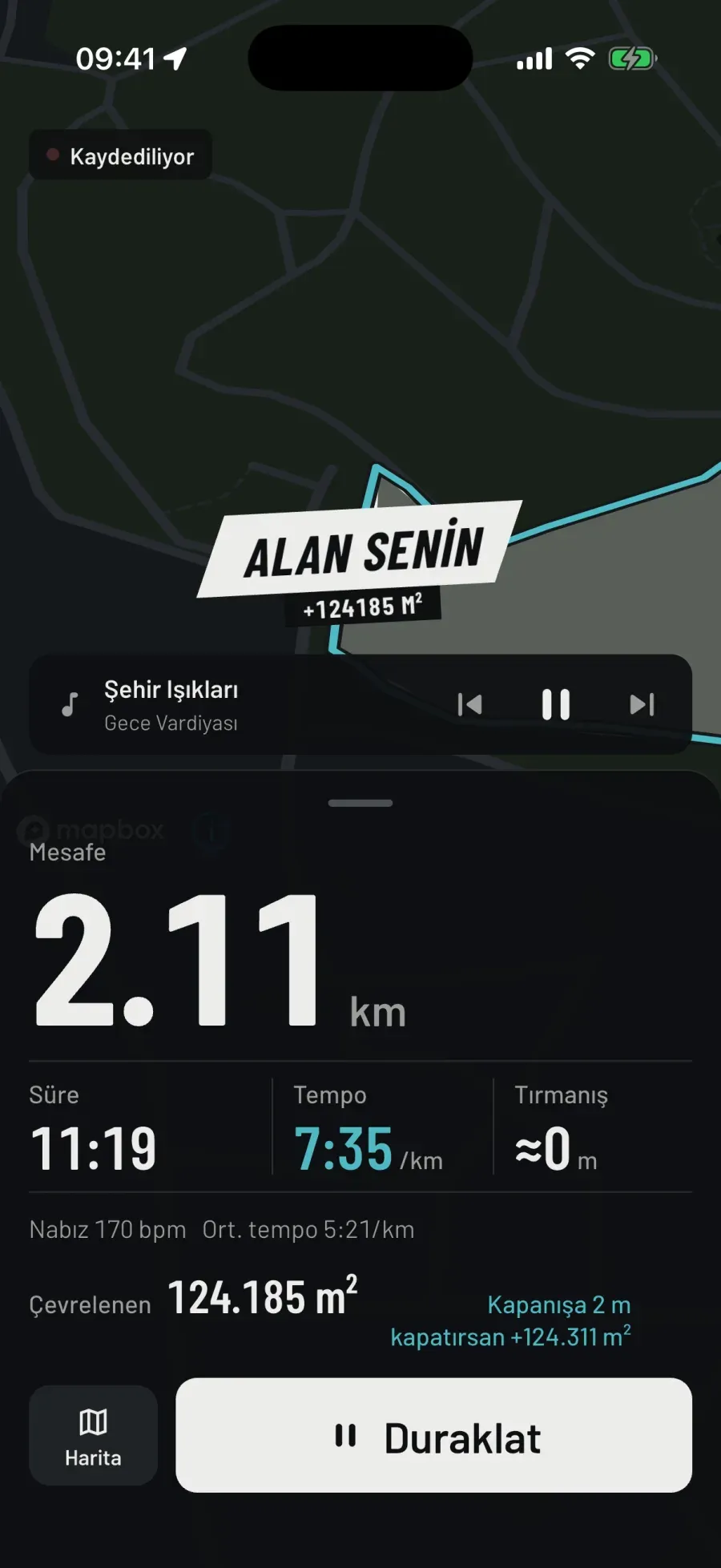
It’s yours · +124,185 m²

Conquest run screen in Turkish, the moment the loop closes: a slanted banner across the map, “It’s yours · +124,185 m²”, the inside of the closed loop grey; distance 2.11 km, time 11:19, pace 7:35 /km; below, Enclosed 124,185 m², 2 m to close, +124,311 m² if you close.

Real screen · iPhone · dark theme

Settings

Sport · place
running only · outdoors only
Permission
motion permission (step sensor) required
Loop
closes when the route comes within 20 m of itself · final after 10 s standing still
Minimum
200 m around · 1,000 m² inside · average width 15 m
Proof of running
slowest 8:00/km · 80% of the perimeter at running pace and cadence · invalid if more than 5% was in a vehicle
Changing hands
when someone encloses another player’s whole loop (at least 90%)
Setup
  • Running only, outdoors only. Start a conquest run.
  • Motion permission is required: the game reads that you’re really running from your steps, your speed and the phone’s activity type. Without a step sensor a loop can’t be verified and doesn’t count.
  • Consent note: the land you take is visible to everyone under your name; slowest pace 8:00/km.
While you run
  • While you run, your trail is drawn on the map. Near the start you get a hint: 2 m to close · +124,311 m² if you close.
  • When the route comes within 20 m of itself the loop closes; stand at the closing point for 10 seconds and it’s final. The inside is yours: an “It’s yours” banner crosses the map and Enclosed goes up.
  • Conditions: at least 200 m around, at least 1,000 m² inside, an average width of 15 m. Running out and back doesn’t count; that’s a strip.
Finish
  • Pause, then Finish. The phone sends the claim to the server; offline, it waits in the queue.
  • The summary opens with the Conquest cover. Summary strip: Waiting for server confirmation, then “+124,185 m² is yours · rank …” or “Not counted: the pace was too slow”. The leaderboard is in square metres.
  • You take someone else’s parcel only by enclosing their whole loop. A parcel doesn’t fade with time.
Voice coach
  • Loop closed: 124,185 square meters are yours.
  • Loop closed but not counted: the pace was too slow.
  • Loop closed but could not be verified: no step sensor.

Result card

“You enclosed 124,185 m² · 1 loop” or “No loop closed”; neutral, no losing colour. After server confirmation, “+124,185 m² is yours · rank …”.

Notes

  • The shape of the land is the route you ran: if it’s crooked, it’s crooked; it isn’t snapped to a grid.
  • An unmeasured 30-metre jump (pausing and walking) breaks the chain. A simulated location is rejected.
  • When a parcel changes hands, the previous owner gets a neutral notification: no area, no place.
Sports
Running only. Walking, cycling or riding a scooter takes no land; the server rejects it too.
On the watch
On Apple Watch and Wear OS too: the watch records, the phone replays and queues the claim; the server decides.
Cost
Free.

Download

Turn running into a game.

Sign in once, then run without internet too. If you like, leave the phone behind and run with the watch; the run is transferred to your phone.

Choose.Run.

App Store

iPhone · Apple Watch

Google Play

Android · Wear OS

All features are free today.

Türkçe · English · Русский